Oracle Integration's unified platform closes the gap between IT-driven API automation and business-driven UI automation. Here is why consolidating on Oracle RPA is the right strategic decision:
|
🌉 Bridge Automation Gaps
UI + API IN ONE PLATFORM
IT teams build API integrations; business teams build UI robots — both in one place. Oracle Integration eliminates the silos and lets teams collaborate on end-to-end automation without switching tools.
|
🏛️ Good Corporate Governance
CENTRAL OVERSIGHT + CONTROLS
A central team vets all new robots, controls deployment to production, and maintains operational excellence — ensuring no unchecked Robot floods Oracle's application servers or breaches license agreements.
|
|
📦 Unified Asset Lifecycle
PROJECT-BASED MANAGEMENT
Robots and integrations are managed together in OIC Projects. Promote entire automation solutions from development to production as a single deployable unit — no manual tracking of dependencies.
|
📡 Unified Observability
SINGLE MONITORING PANE
Monitor all robots, integrations, and process applications from one OIC dashboard. Proactive email notifications and detailed troubleshooting pages eliminate the multi-tool monitoring overhead of legacy RPA platforms.
|
|
🔮 Future-Proof Architecture
ROBOT → API SWAP-OUT READY
Every robot is wrapped by an integration. If UI automation is later replaceable by a REST API, simply version the integration and swap the robot out — no business process disruption. Your automation strategy evolves as your applications evolve.
|
⚡ Eliminate Manual Navigation
BOT-DRIVEN UI AUTOMATION
RPA Bots log into Oracle SaaS, navigate module screens, read and update data — with no human hands required during the automation window. Finance teams are freed from repetitive, error-prone data entry.
|
01B — COST & VALUE
Cost Comparison: Traditional RPA vs Oracle Gen3 RPA
One of the most compelling reasons to consolidate on Oracle Gen3 RPA is the total cost of ownership. Traditional RPA platforms carry a layered cost structure that organisations often underestimate — separate licensing, specialist skill hiring, and a fleet of VMs that must be provisioned and maintained by your own team regardless of whether bots are running or idle.
Oracle Gen3 RPA fundamentally changes this model. Oracle manages the compute infrastructure, and the built-in Autoscale capability means VMs grow when you need them and shrink when you don't — so you pay only for what you actually use.
💰 Cost Model: Traditional RPA vs Oracle Gen3 RPA TCO COMPARISON
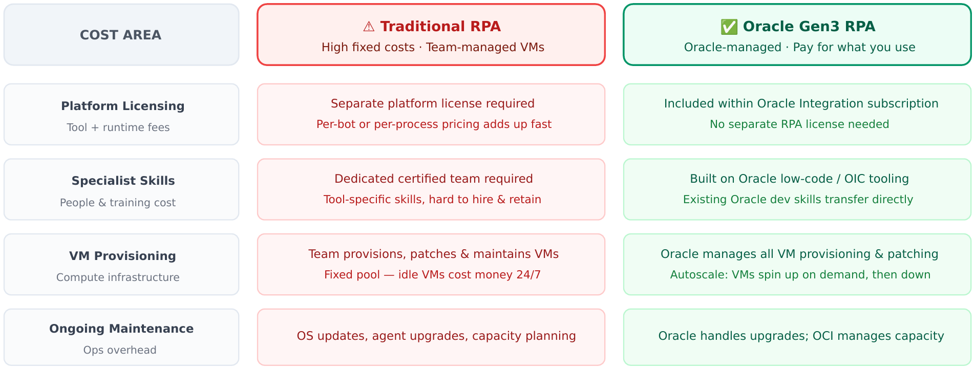
Traditional RPA tools require separate licensing, a dedicated specialist team, and a manually managed fixed VM pool. Oracle Gen3 RPA eliminates all three overhead categories.
How Oracle Gen3 RPA Autoscaling Saves Cost
The single biggest operational cost driver in traditional RPA is the VM fleet — a fixed pool of machines that must be kept running at peak capacity even when bot workload is low. Oracle Gen3 RPA solves this with OCI-native autoscaling directly built into the platform.
|
💸 Traditional: Always-On VMs
FIXED COST REGARDLESS OF LOAD
Traditional RPA requires a team to manually provision VMs, install agent software, apply patches, and maintain that fleet indefinitely. During off-peak hours — nights, weekends, holidays — those VMs sit idle and still incur compute costs.
|
📉 Gen3 RPA: Scale In When Quiet
IDLE VMS AUTO-REMOVED
When bot workload drops below the configured scale-in threshold (e.g., 50% utilisation), Oracle Gen3 RPA automatically terminates surplus VMs from the OCI instance pool. You stop paying for compute you don't need — automatically.
|
|
📈 Gen3 RPA: Scale Out Under Load
NEW VMS AUTO-PROVISIONED
When workload surges — like payment cut-off runs or end-of-month credit batch jobs — and utilisation exceeds the scale-out threshold (e.g., 120%), Oracle automatically provisions new VMs using your pre-baked custom image. Bots are ready in seconds with no manual intervention.
|
🔧 Oracle Manages the Infrastructure
ZERO OPS OVERHEAD
Oracle handles OS patching, agent upgrades, instance health checks, and capacity planning for the autoscale pool. Your team focuses on building and monitoring automation — not managing servers. This removes an entire layer of dedicated infrastructure ops that traditional RPA requires.
|
⚡ Oracle Gen3 RPA Autoscale — Cost Profile Over a Day OCI AUTOSCALE
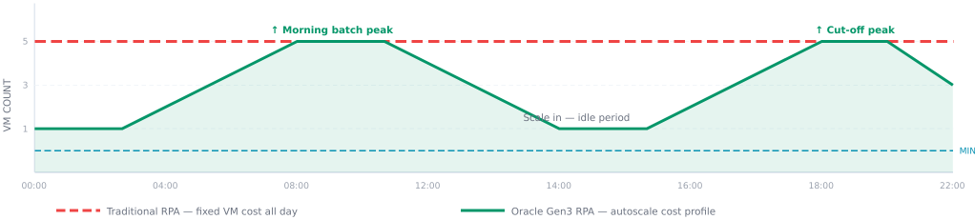
▲ Traditional RPA maintains a fixed VM pool all day regardless of bot activity (red dashed). Oracle Gen3 RPA automatically scales VMs down during quiet periods and up during batch peaks — the green area under the curve is what you pay for.
|
Bottom Line: By eliminating separate platform licensing, removing the need for a dedicated infrastructure specialist team, and replacing fixed VM pools with Oracle-managed autoscaling compute, Oracle Gen3 RPA delivers the same automation outcomes at significantly lower total cost of ownership — and without the operational burden of maintaining the underlying infrastructure.
|
02 — AUTOMATION STRATEGY
When to Use Robots vs. Integrations
Oracle Integration supports both API-based and UI-based automation. Choosing the right approach is the foundation of a good automation strategy. The decision matrix below provides clear guidance.
⚖️ Robots vs. Integrations — Decision Framework OIC 3.0
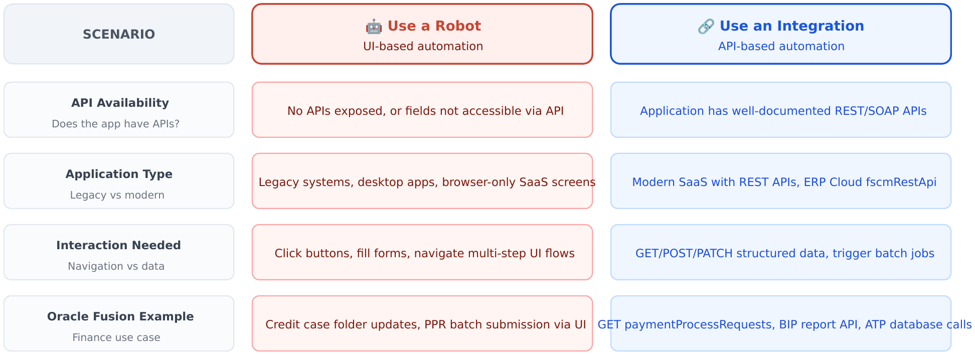
▲ Decision matrix: use robots when APIs don't expose the required fields or UI navigation is mandatory; use integrations for API-available actions.
|
Oracle's Approach: The best automation solutions combine both — OIC integrations orchestrate the workflow and handle API calls, while RPA Bots handle the UI actions that no API exposes. This hybrid pattern is the foundation of both use cases in this guide.
|
03 — ARCHITECTURE STACK
The Oracle Automation Toolkit
Oracle's cloud-native automation stack is purpose-built to run inside the OCI security boundary. Every component below uses Oracle Identity Cloud Service (IDCS) for authentication and feeds into the same observability infrastructure.
🏗️ Oracle RPA Architecture — Platform Overview OCI ARCHITECTURE
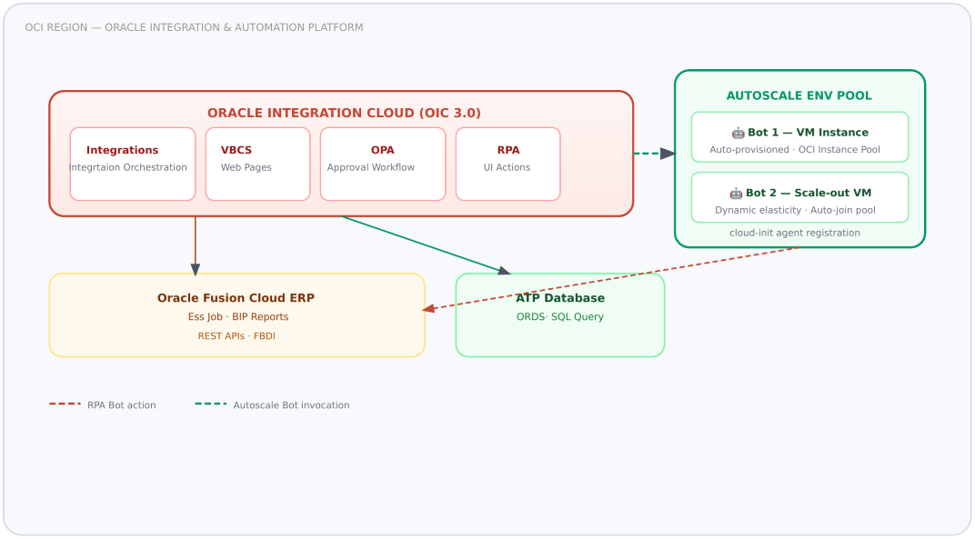
▲ OCI-hosted Oracle automation stack — OIC orchestrates ESS jobs, BIP reports, and RPA Bots running on an autoscale environment pool. Bots interact directly with Fusion screens; OIC manages the data pipeline.
|
Architecture Principle: All components sit within the same OCI tenancy, using Oracle IDCS for unified identity. This eliminates the cross-platform credential complexity of traditional RPA tools.
|
04 — CORE MIDDLEWARE
Oracle Integration Cloud (OIC) — The Orchestration Brain
Oracle Integration Cloud is the central nervous system of this architecture. It handles scheduling, data extraction, Bot invocation, error management, status polling, and notification dispatch.
|
🔗 Integration Connections
ADAPTERS & CONNECTIVITY
Pre-built adapters for Oracle ERP Cloud, REST, SOAP, FTP/SFTP, ATP database, and Email — configured once and reused across integrations. Credentials stored in OIC Connections, never hard-coded.
|
🔄 Parent–Child Pattern
BATCH LOOPING
In scenarios where Oracle Fusion tasks must be executed repeatedly across multiple records, a parent integration partitions the workload into manageable batches. Each batch triggers a corresponding child integration, which invokes the RPA robot to iterate through each record and perform the required UI-driven task. This approach ensures scalable execution while enabling isolated error handling at the record level, so failures in individual records do not block the entire batch.
|
|
⚠️ Error Hospital
ERROR MANAGEMENT
When an integration fails in Oracle Integration Cloud (OIC), the global fault handler provides a centralized mechanism to capture and log error details, including payload context, error codes, and execution metadata. As part of a well-defined error handling strategy, email notifications can be configured to alert the support team with comprehensive contextual information for faster diagnosis and resolution, aso depending on operational requirements, this framework can further be integrated with IT service management platforms such as ServiceNow to enable automated incident creation, ensuring timely tracking, escalation, and governance of integration failures.
|
⏱️ Bot Wait & Poll
ASYNC STATUS MANAGEMENT
After invoking a Bot, the child integration waits for completion, polling the Bot's output payload for success or failure status before proceeding to the next step or routing errors.
|
|
📊 ESS Job Triggering
SCHEDULED EXECUTION
OIC integrations are triggered via Oracle Enterprise Scheduler Service (ESS) jobs with input parameters that control which records are processed in each run.
|
🔒 Security Model
SSL + BASIC AUTH
All service communications use SSL (HTTPS transport-level). Service-level authorization via Basic Authentication. A robot doesn't need information about an application's security protocols — OIC handles that at the connection level.
|
05 — AUTOMATION ENGINE
Oracle RPA Bot — How It Works
An Oracle RPA Robot is a software script that specifies the steps to follow for accomplishing a task using an application's user interface. A robot performs work just like a human, at scale, without errors from fatigue. Unlike an integration, a robot doesn't need information about an application's security protocols — it automates the UI just as a user would.
|
Key Distinction: Robots automate without APIs. When a business process requires updating a field that Oracle doesn't expose through fscmRestApi, a Robot navigates to the screen and updates it directly — no API needed. This is the core value proposition of Oracle RPA.
|
What the Bot Can Do
|
1
|
Authenticate into Oracle Fusion SaaS
The Bot logs in using a dedicated service account ensuring UI automation is attributable and auditable under a known identity. Credentials are stored in OIC Robot Connections with an extra measure of security.
|
|
2
|
Navigate any Oracle Fusion module
Bots follow the same navigation paths a human would use — Home → Payables → Payments → Submit PPR, or Home → Receivables → Credit Reviews — without custom APIs. Any module is automatable.
|
|
3
|
Read screen data and match conditions
The Bot reads field values from the UI and applies business logic adn do the respective actions"
|
|
4
|
Perform UI actions
Click buttons (Submit, Refresh, Remove), fill fields (credit limit, classification, payment date), select dropdown values, tick checkboxes — all operations scripted from the input payload received from OIC.
|
|
5
|
Return structured output
After processing each record, the Bot captures success/failure status and stores it in the output payload. OIC reads this to determine next steps like sending email notification or trigger next bot UI action.
|
Available Robot Patterns
|
PATTERN
|
DESCRIPTION
|
EXAMPLE
|
|
Trigger-only
|
OIC integration invokes a robot with an input payload; robot runs asynchronously
|
Credit recommendation update per case folder
|
|
Trigger + Output
|
Robot returns a structured output payload that OIC reads to determine next steps
|
Payment batch creation, status captured per batch
|
|
Looping Robot
|
Robot iterates over a list from its input payload, processing each item in sequence
|
Loop through case folders: search → update → close
|
|
Fallback Robot
|
Secondary robot invoked when primary robot fails; handles exception workflows
|
Credit analyst reassignment when Bot 1 fails
|
06 — INFRASTRUCTURE CONFIGURATION
Configuring Autoscale VM for Oracle RPA
Oracle RPA supports dynamic auto-scaling of Robot Agent environments using Oracle Cloud Infrastructure (OCI) Instance Pools. This enterprise feature eliminates the need to manually provision Bot VMs — the RPA platform monitors workload and automatically scales VMs in and out based on utilization.
|
What Autoscaling Provides: Auto-provisioning of VMs using OCI managed instance pools · Dynamic elasticity where VMs are added or removed as needed · Automatic agent registration allowing new environments to auto-join the RPA environment pool without manual intervention.
|
How Utilization-Based Scaling Works
The scaling decision is based on environment pool utilization. Utilization of an individual environment is calculated based on the number of robot instances currently running plus instances queued. If Environment 1 has 200% utilization and Environment 2 has 300%, the pool utilization is 250% (the average).
📐 Autoscale VM — 6-Step OCI Configuration Workflow OCI CONSOLE + RPA UI
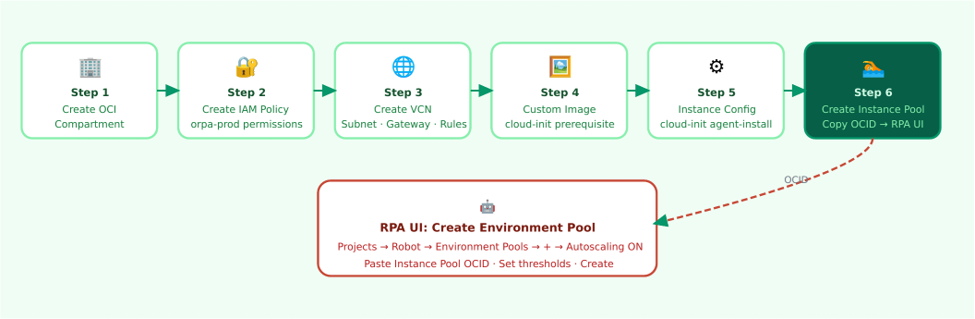
▲ One-time OCI Console setup (Steps 1–6) creates the instance pool. Then in the RPA UI, create an environment pool with Autoscaling ON and paste the Instance Pool OCID.
Step-by-Step: OCI Console Configuration
|
1
|
Create an OCI Compartment
In Oracle Cloud Console → Identity & Security → Compartments, create a dedicated compartment (e.g., rpa-dynamic-env) under root. This isolates all RPA autoscale resources and simplifies IAM policies.
|
|
2
|
Create an IAM Policy
In Identity & Security → Policies, create a policy (e.g., rpa-dynamic-env-policy) in the root compartment. Add the following statements granting the orpa-prod service the rights to manage instance pools, instances, configurations, images, and virtual networking within your compartment.
|
allow service orpa-prod to manage instance-pools in compartment <compartment-name>
allow service orpa-prod to manage instances in compartment <compartment-name>
allow service orpa-prod to manage instance-configurations in compartment <compartment-name>
allow service orpa-prod to use instance-images in compartment <compartment-name>
allow service orpa-prod to use virtual-network-family in compartment <compartment-name>
|
|
|
3
|
Create a VCN, Subnet, Internet Gateway, and Route Table
In Networking → Virtual cloud networks, create a VCN (e.g., rpa-dynamic-env-vcn) with CIDR 10.0.0.0/16. Add a public subnet (10.0.0.0/24), internet gateway, and a default route rule pointing to the gateway (0.0.0.0/0). For Windows-based robot VMs, add an ingress security rule for TCP/3389 (RDP).
|
|
4
|
Create a Custom Image Using RPA cloud-init Scripts
Download the Robot Agent. Two cloud-init scripts are provided: rpa-cloud-init-script-prerequisite-software (installs JDK, Python, browsers) and rpa-cloud-init-script-agent-install (downloads RPA binaries and configures the agent as a startup service). Create a Compute Instance using the prerequisite script, verify the log shows "RPA pre-requisite software has installed successfully," then create a Custom Image (e.g., rpa-agent-image-prerequisite-linux-v1.0).
Supported OS: Oracle Linux 8+ (AMD/Intel) with Headless Chrome/Firefox, or Windows Server 2016/2019/2022/2025 with Google Chrome or Mozilla Firefox.
|
|
5
|
Create an Instance Configuration
In Compute → Instance Configurations, create a new configuration using your custom image and desired shape (e.g., VM.Standard2.2). In Advanced Options → Instance metadata service, you must select "Require an authorization header." Under Initialization script, attach the rpa-cloud-init-script-agent-install file. Set AGENT_COUNT=1 in the script (default; increase only for high-capacity production instances). Select your VCN and subnet from Step 3.
|
|
6
|
Create an Instance Pool and Copy the OCID
In Compute → Instance Pools, create a pool (e.g., rpa-inst-pool-project1-envpool1) with at least 1 instance, pointing to your instance configuration. After the pool shows "Running" in the console, wait 40–50 seconds and verify the new environment appears in OIC → Observability → Agents. Copy the Instance Pool OCID — you'll need it in the next step.
|
Step 7: Create the Environment Pool in the RPA UI
With the OCI instance pool running, now configure the autoscale environment pool inside Oracle Integration:
|
OIC UI
|
Navigate: Projects → select your project name → Robot (left toolbar) → Environment Pools box → Add (+)
|
|
OIC UI
|
Fill in pool name, enable "Share with other projects" if robots from multiple projects will use this pool, then toggle Autoscaling ON
|
|
OIC UI
|
Paste the Instance Pool OCID copied from Step 6 into the Instance Pool OCID field — this links the OCI infrastructure to the RPA environment pool
|
|
OIC UI
|
Configure autoscale thresholds: set Minimum Instances, Maximum Instances, Scale-out threshold %, Scale-in threshold %, Cooldown period, and Window period (see table below)
|
|
OIC UI
|
Click Create. The environment pool now shows "Autoscaling" next to its name. Associate your robots with this pool to enable elastic execution.
|
Autoscaling Configuration Parameters
|
PARAMETER
|
PURPOSE
|
EXAMPLE VALUE
|
WHY IT MATTERS
|
|
Instance Pool OCID
|
Links to the OCI instance pool for VM provisioning
|
ocid1.instancepool.oc1.xx…
|
Required — without this, autoscaling cannot provision new VMs
|
|
Minimum Instances
|
Baseline capacity always maintained
|
2
|
Prevents scaling to zero; ensures bots are always ready for immediate execution
|
|
Maximum Instances
|
Upper VM count limit
|
5
|
Controls cost and prevents over-provisioning beyond license or budget limits
|
|
Scale-Out Threshold (%)
|
Average utilization triggering scale-out
|
120%
|
When pool utilization exceeds this over the window period, new VMs are added automatically
|
|
Scale-In Threshold (%)
|
Average utilization triggering scale-in
|
50%
|
Reduces idle VMs during low load to minimize OCI compute costs
|
|
Cooldown Period
|
Wait time between consecutive scaling events
|
5 minutes
|
Prevents rapid oscillation (scale-out → scale-in → scale-out) due to transient spikes
|
|
Window Period
|
Duration over which average utilization is calculated
|
15 minutes
|
Ensures scaling decisions are based on sustained load patterns, not momentary spikes
|
|
Important Constraint: After creating an environment pool with autoscaling, you cannot manually add or delete individual environments from the pool. You can only update pool settings or delete the entire pool. Scaling is fully managed by the OCI instance pool.
|
Autoscale Best Practices
|
1
|
Use a dedicated compartment with scoped IAM policies
Keep all autoscale resources (VCN, subnet, custom image, instance pool) in one compartment. This ensures consistent access control, simplifies management, and applies the principle of least privilege.
|
|
2
|
Use custom images for fast VM provisioning
Pre-baking JDK, browsers, and Python into the custom image means new instances launch in seconds rather than minutes — critical when your bot workload spikes before a payment cut-off window.
|
|
3
|
Set strategic scaling thresholds
A scale-out threshold of 80% and scale-in threshold of 50% gives enough time for new instances to join the pool before workload surges. Combine with a 5-minute cooldown to prevent thrashing.
|
|
4
|
Validate the custom image before creating the pool
Verify the instance log confirms "RPA pre-requisite software has installed successfully" before baking the image. A bad image will cause all auto-provisioned VMs to fail silently at agent registration.
|
|
5
|
Monitor agent registration in OIC Observability
After instance pool creation, verify new environments appear under OIC → Observability → Agents within 40–50 seconds. If they don't appear, check the agent output log at /home/opc/rpa_agent/agents/agent_1/agent_output.log (Linux) or the equivalent Windows path.
|
07 — ROBOT RESILIENCE
Dynamic Selectors — Resilient UI Targeting
One of the most common challenges in RPA is UI change — when Oracle updates a screen layout, XPath changes, and robots break. Oracle RPA addresses this through multiple captured selectors and an AI-assisted self-healing mechanism that automatically adapts to UI changes without requiring manual robot updates.
|
Why Multiple Selectors Matter: When a robot runs and cannot find the first selector on a web page, it automatically attempts the second and then the third selector. This dramatically reduces the time spent troubleshooting targeting issues caused by minor Oracle UI updates.
|
How Oracle RPA Captures Selectors
Every time you target a UI element using the Robot recorder or the low-code builder, Oracle Integration automatically captures three selectors for that element. These are stored in the Locator field's Target Selector, separated by commas.
Three Selector Types Captured Per UI Element
|
#
|
Type
|
Example Prefix
|
|
1
|
Relative XPath
|
xpath://[…]
|
|
2
|
Absolute XPath
|
xpath:/html/body/…
|
|
3
|
Absolute CSS
|
css:div#buttonName
|
Viewing and Editing Selectors
|
RPA UI
|
Open a Robot: Projects → select project → Robot (left toolbar) → Robots box → open robot. The canvas appears.
|
|
RPA UI
|
Open an Action: double-click any action on the canvas. The action panel appears on the right side.
|
|
RPA UI
|
View selectors: click within the Locator field, then select Show target selector. The Target selector field appears below, listing all three selectors separated by commas.
|
|
RPA UI
|
Paste a custom XPath: copy any XPath from browser DevTools, paste into the Locator field prefixed with xpath:. Example: xpath://*[@id="buttonName"]
|
AI-Assisted Self-Healing
Oracle RPA includes an AI-assisted self-healing feature that automatically predicts and adapts to UI changes. When XPath or CSS selectors change due to an Oracle application update, the self-healing feature analyzes the current page structure and suggests or applies updated selectors without requiring a full robot rebuild.
|
🩹 Self-Healing Selectors
AI-ASSISTED RECOVERY
When XPath or CSS selectors fail due to UI modifications, Oracle RPA's self-healing feature predicts the correct selector from the updated page structure and repairs the robot automatically.
|
🎯 Pre-Validation Conditions
3-SELECTOR PRE-CHECK
The recorder captures all three selector types for each target element in pre-validation conditions. This ensures that even if the first selector fails the pre-check, the robot retries with alternate selectors before raising an error.
|
|
🔧 Manual Selector Refinement
OVERRIDE + TUNE
For Oracle Fusion screens with dynamic IDs or complex iframes, manually refine selectors using relative XPath expressions that target semantic attributes rather than auto-generated IDs — making robots immune to minor layout changes.
|
|
Real-World Example: Oracle Fusion Credit Reviews — Case Folder Selector
A practical scenario that illustrates why auto-recorded selectors are insufficient and how to write a robust dynamic selector instead. When a robot records a click on a Case Folder Number link inside Oracle Receivables Credit Reviews, the recorder auto-captures three selectors that all rely on Oracle's auto-generated component IDs.
🔴 Problem: Auto-Recorded Selectors from Oracle Fusion
When you click a Case Folder Number link, the recorder captures these three selectors — all anchored to Oracle's internal auto-generated component IDs:
|
/* Selector 1 — Relative XPath using Oracle's auto-generated component ID */
"xpath://*[@id=\"_FOpt1:_FOr1:0:_FONSr2:0:_FOTsr1:1:SP2:ls1:AT1:_ATp:ATt1:0:cl1\"]"
/* Selector 2 — Absolute XPath traversing the full DOM tree (86 levels deep) */
"xpath:/html/body/div[1]/form/div[1]/div[2]/div/div/div/div[3]/div/div[2]/div/div/div
/div/div/div/div/div/div/div/div/div/div/div[1]/div/div/div/div[1]/div[3]/table
/tbody/tr/td[1]/div/div/div[1]/div/div[1]/div/div/div/div/div/div[2]/div/div/div
/div[2]/div/div/div/div/div/div/div/div[2]/div/div/table/tbody/tr/td[3]/div[1]
/div[2]/div/div[2]/table/tbody/tr/td[1]/span/a"
/* Selector 3 — Absolute CSS using escaped Oracle component ID */
"css:a#_FOpt1\\3a _FOr1\\3a 0\\3a _FONSr2\\3a 0\\3a _FOTsr1\\3a 1\\3a SP2\\3a ls1\\3a AT1\\3a _ATp\\3a ATt1\\3a 0\\3a cl1"
|
✅ Solution: Dynamic Selector Using the Input Payload Variable
Instead of relying on Oracle's auto-generated IDs or DOM position, write a semantic XPath that searches for the actual Case Folder Number value from the robot's trigger input — making it precise, dynamic, and immune to ID changes:
|
/* Dynamic selector — finds the exact cell containing the case folder number */
xpath://td[normalize-space()='${currEachCreditReviews["CASE_FOLDER_NUMBER"]}']
|
|
APPROACH
|
SELECTOR USED
|
RISK
|
CORRECT RECORD IN LOOP?
|
|
Auto-recorded (ID)
|
xpath://*[@id="_FOpt1:…:cl1"]
|
Breaks on Oracle patch
|
❌ Always row 1
|
|
Auto-recorded (Absolute XPath)
|
xpath:/html/body/div[1]/…/span/a
|
Breaks on any layout change
|
❌ Positional only
|
|
Auto-recorded (CSS)
|
css:a#_FOpt1\\3a …
|
Breaks on Oracle patch
|
❌ Always row 1
|
|
Dynamic (recommended)
|
xpath://td[normalize-space()='${currEachCreditReviews["CASE_FOLDER_NUMBER"]}']
|
Immune to ID/layout changes
|
✅ Always correct record
|
|
Self-Healing Limitation: Self-healing works best with moderate UI changes. If Oracle performs a major navigation restructuring (e.g., moving a feature to a different module menu), the robot requires manual update regardless of self-healing. Always validate robots against a UAT environment before Oracle quarterly patch cycles.
|
08 — SUPPORTING SERVICES
Supporting Oracle Services Explained
The two use cases involve a consistent set of Oracle platform services. Here is a concise reference for each.
|
📋 ESS (Enterprise Scheduler Service)
SCHEDULING ENGINE
Oracle's built-in job scheduler inside Fusion Cloud. Triggers OIC integrations on defined frequency or on-demand. Accepts input parameters like region name or reprocess flags that drive integration behavior.
|
📊 BIP (BI Publisher)
REPORTING & DATA EXTRACTION
Oracle BI Publisher generates formatted reports from SQL queries against Oracle ERP tables. Used to extract case folder data and payment register details. OIC invokes BIP via API and reads the output CSV/XML.
|
|
🗄️ ATP (Autonomous Transaction Processing)
STATUS PERSISTENCE
OCI-managed Oracle database. Stores Bot processing status per record. DB packages handle validation checks (null credit limit, null currency). ORDS publishes REST APIs over ATP tables for OIC consumption.
|
🖥️ VBCS (Visual Builder Cloud Service)
DASHBOARD / CONFIG UI
Oracle's low-code platform for configuration dashboards. In payment batch automation, VBCS hosts Schedule Templates, Template Mapping, and Configuration Templates that OIC reads as pre-requisites before Bot execution.
|
|
🌐 Oracle ERP REST APIs
FUSION INTEGRATION LAYER
Oracle exposes fscmRestApi REST endpoints for Fusion Cloud objects — Payment Process Requests, Case Folders, Reports. OIC calls these APIs for status checks, PATCH operations, and report submissions complementing Bot UI actions.
|
🔔 ServiceNow + Email
EXCEPTION MANAGEMENT
Whenever any UI action fails, we can call Service now api to auto-create ServiceNow incidents. Email notifications with error details or batch exception summaries drive manual follow-up by the right analyst.
|
09 — USE CASE 1
Customer Credit Recommendations (EXT-016)
Oracle Receivables Traditional RPA → Oracle Gen3 RPA Migration OIC + RPA Bot + ATP
This use case automates updating credit recommendations and closing credit case folders in Oracle Receivables. Previously managed by a traditional RPA tool, it is now migrated to Oracle's native Gen3 RPA platform, with OIC as orchestration and ATP as state persistence.
|
Business Problem: Finance teams must review credit case folders, enter a Credit Limit and Credit Classification for each customer, and reassign analysts when case processing fails. Doing this manually for hundreds of accounts is time-consuming and error-prone.
|
📐 EXT-016 — Credit Recommendation End-to-End Flow HYBRID CLOUD + OIC
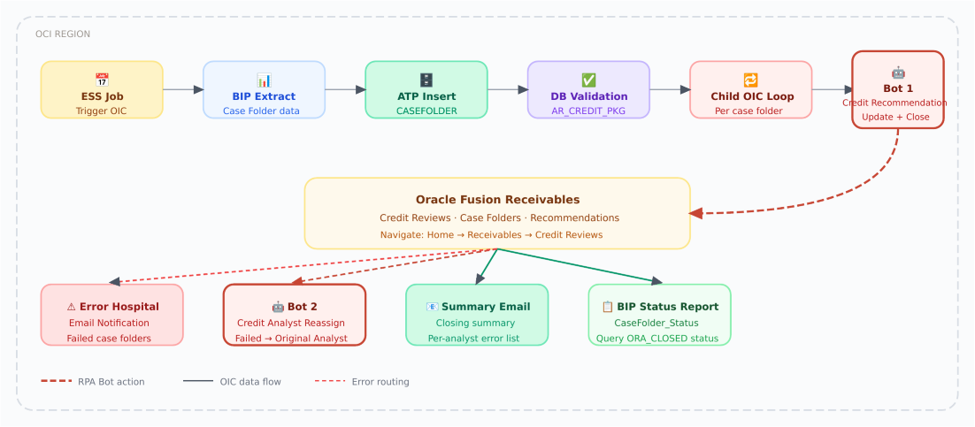
▲ EXT-016 end-to-end: ESS triggers OIC → BIP extracts case folders → ATP stores state → Child integration loops → Bot 1 updates Receivables → errors routed to Bot 2 for analyst reassignment.
Bot 1: Credit Recommendation Update — Step by Step
|
RPA BOT
|
Login to Oracle SaaS using the Fin Thirty One service account
|
|
RPA BOT
|
Navigate: Home → Receivables → Credit Reviews
|
|
RPA BOT
|
Loop through each case folder: clear filter, search by case folder number, select the record
|
|
RPA BOT
|
Reassign credit analyst to the Fin Thirty One service user (required to unlock editing)
|
|
ORACLE ERP
|
Open case folder → click "Recommendations" tab → enter Credit Limit and Credit Classification from the input payload
|
|
ORACLE ERP
|
Save recommendation; on error: click "Save and Close" and continue to next iteration
|
|
OIC CHILD
|
Collect output payload: success/failure status per case folder; if Bot fails — invoke BIP Status Report to check ORA_CLOSED, send error email to analyst
|
Business Rules Embedded in the Integration
|
RULE
|
CONDITION
|
ACTION
|
|
Government / Direct Debit customers
|
Account classification = Gov or DD
|
Auto-close case with "Low Risk" — no Bot needed
|
|
Low credit score
|
Total Score < 20
|
Do NOT auto-close; analyst initiates manual review
|
|
Score 21–50
|
Moderate range
|
Classify as "Moderate Risk"
|
|
Score > 50
|
High range
|
Classify as "Low Risk"
|
|
Null validation
|
Missing email / currency / limit / classification
|
DB Package blocks record; error is logged
|
10 — USE CASE 2
Payment Batch Automation Solution
Oracle Payables Payment Process Requests OIC + RPA Bot + VBCS
The Payment Batch Automation solution automates Oracle Fusion Payables payment batch submission. VBCS hosts configuration templates that drive OIC, which orchestrates a multi-step Bot workflow: create batch → validate → download report → validate invoices → remove rejections → format → confirm transmission.
|
Business Problem: Payment batches must be submitted, validated against currency rules and cross-currency thresholds, have rejected invoices removed, then formatted and transmitted — all before payment cut-off times. Manual execution across dozens of payment templates per region is high-risk and labor-intensive.
|
📐 Paymnet Batch Automation Solution — Payment Batch End-to-End Architecture HYBRID CLOUD + OIC
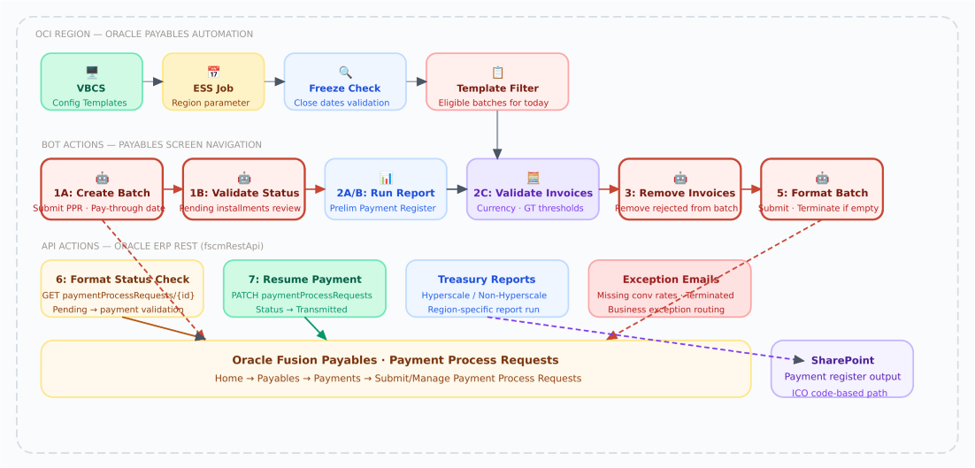
▲ Payment Batch Automation solution: VBCS templates + ESS trigger → OIC orchestrates Bot actions (create batch, validate, remove invoices, format) and REST API calls (status check, resume, reports) against Oracle Payables.
Currency & Threshold Business Rules
|
RULE
|
CONDITION
|
ACTION
|
|
Excluded Currency
|
API response currency = Excluded Currency in template mapping
|
Send business exception immediately
|
|
Single Payment GT (USD)
|
Not "N/A" AND aggregate USD payment > GT value
|
Exception OR remove invoice (per "Single Payment GT Action")
|
|
Cross Currency GT
|
Payment currency ≠ batch currency AND USD amount > Cross Currency GT
|
Exception OR remove invoice (per "Cross Currency Action")
|
|
Batch currency = 'zzz'
|
Special all-currency marker in template
|
Select "All" for currencies in Selection Criteria
|
|
Zero selected invoices
|
Selected invoice count = 0 after all validation
|
Do not download report; terminate batch for this template
|
11 — ARCHITECTURE COMPARISON
Use Case Comparison at a Glance
|
DIMENSION
|
UC-1: CREDIT RECOMMENDATIONS
|
UC-2: PAYMENT BATCH
|
|
Module
|
Oracle Receivables — Credit Reviews
|
Oracle Payables — Payment Process Requests
|
|
Trigger
|
ESS Job (On Demand)
|
ESS Job (Region parameter, scheduled)
|
|
Pre-requisite Config
|
BIP Report extract from AR tables
|
VBCS-hosted Schedule / Template / Config dashboards
|
|
Number of Bots
|
2 Bots (update + analyst reassign)
|
3 Bot actions (create batch · remove invoices · format)
|
|
API Layer
|
Minimal (BIP status query)
|
Heavy — PPR GET/PATCH, report APIs, resume API
|
|
Data Persistence
|
ATP table (CASEFOLDER_DETAILS)
|
VBCS Template Mapping + SharePoint reports
|
|
Error Handling
|
Error Logging + ServiceNow + per-analyst email
|
Business exception email + terminated batch alert
|
|
Business Rules
|
Credit score thresholds + classification
|
Currency exclusion + Single/Cross Payment GT thresholds
|
|
Migration Source
|
Traditional RPA tool
|
New Oracle Gen3 RPA implementation
|
12 — OPERATIONS & BUILD
Best Practices for Oracle RPA Projects
Drawing from Oracle's official RPA documentation and production implementation experience, these best practices help teams build reliable, maintainable, and scalable robot automation.
Operations Best Practices
|
📣 Promote Communication
CROSS-TEAM COORDINATION
Robot builder, integration designer, and monitoring team often work separately. Identify availability early, create a shared schedule, and hold periodic check-ins to align on deadlines and contracts.
|
🔁 Automate Today, Iterate Later
AGILE AUTOMATION
If today's business process is working, automate it now without redesigning it first. Deploy to production and use the insights gained from monitoring to identify optimization opportunities.
|
|
📝 Define Contracts Up Front
INTERFACE-FIRST DESIGN
Robot developers and integration developers can work in parallel once the contract is agreed upon — what input the robot expects and what output it delivers. A robot shell takes minutes to create.
|
📈 Strive for Continuous Improvement
POST-DEPLOY OPTIMIZATION
Deploying to production is the beginning of the journey. Analyze metrics after deployment — identify approvals that take 6.5 days on average, expand approver pools, or remove unnecessary checkpoints.
|
Environment Best Practices
|
1
|
Set up enough environments for your workload
If a robot runs in 2 minutes but is called every minute, you create a backlog. Factor in: robot run time, call frequency, likelihood of performance issues, and business impact of a backlog. Use the autoscale pool to handle burst loads automatically.
|
|
2
|
Replicate the robot's exact runtime environment
A robot's environment is a clean slate — no saved credentials, no browser preferences. The account used to build the robot may have different permissions than the production service account. Always validate robots against a clean UAT environment that mirrors production.
|
|
3
|
Follow all license agreements
Verify your application license agreements allow for automation. A large number of simultaneous robot executions can impact Oracle SaaS performance — design your environment pools and throttle OIC child invocations accordingly.
|
|
4
|
Monitor environments throughout the day
Use OIC Observability to check that all environments are online, agents are running, and no unexpected backlogs are forming. Set up proactive email notifications for environment disconnections.
|
Building & Testing Best Practices
|
PRACTICE
|
GUIDANCE
|
|
Use multiple selectors
|
Let Oracle RPA capture all three selectors (relative XPath, absolute XPath, CSS) for every locator. This makes robots resilient to minor UI changes.
|
|
Avoid hard-coded data
|
Use Variables, Web Table Definitions, and trigger input/output parameters instead of hard-coded values in robot steps. This makes robots reusable across environments.
|
|
Test on the actual environment
|
Test a robot on its dedicated environment — not the recorder's machine — to replicate real production conditions including network, browser version, and permission levels.
|
|
Test end-to-end with integration
|
Test the robot AND the integration together to ensure the full automation chain succeeds. Bot invocation, wait logic, status polling, and error routing all need end-to-end validation.
|
|
Document system requirements
|
Each robot has specific browser, OS, and network requirements. Document them and enforce them in environment setup to prevent random failures after OS patches.
|
13 — FURTHER READING
References & Documentation
These Oracle documentation resources and reference architectures inform the patterns described in this guide and provide deeper technical guidance for implementation teams.
|
About This Blog: This article is part of the Business Enablement Oracle RPA series, documenting production RPA migration patterns from traditional RPA tools to Oracle Gen3 RPA using Oracle Integration Cloud 3.0 as orchestration within an OCI tenancy. Content enriched with Oracle's official "Using Robots in Oracle Integration 3" documentation (F85348-14, April 2026). Architecture diagrams follow the OCI Architecture Diagram Toolkit visual language.
|
About the Authors:
Ajay Narayan (Author)
Ajay Narayan is a Global Information & Technology Integrations Architect with two decades of experience, currently serving as Senior Manager at Equinix. He specializes in Oracle PaaS, AI-driven solutions, and enterprise cloud architecture. Recognized as an “AI and Cloud Architect of the Year,” he has led several large-scale digital transformation initiatives. Ajay brings deep expertise in designing scalable integrations and modern cloud solutions.
Silita Patro (Co-Author)
Silita Patro is an Oracle-certified technology professional with 9.5+ years of experience implementing Oracle Cloud solutions across finance, receivables, and procurement modules. She has led end-to-end Oracle Cloud implementations using OIC, VBCS, FBDI, and BI/OTBI, and has guided cross-functional teams on global projects spanning industries like energy, telecommunications, and financial services. She brings deep technical expertise paired with strong client-facing and mentorship experience to every engagement.