Your organization has already made a significant investment in Oracle E-Business Suite (EBS), but are you fully leveraging the tools and capabilities that are already in place?
Too often, businesses look outward for innovation when the key to greater efficiency, productivity, and return on investment (ROI) lies within the technology they already own.
This article explores how your technical and functional teams can boost performance, reduce manual effort, and improve data quality without costly upgrades or system overhauls.
The Challenge: Untapped Potential in Oracle EBS
Oracle EBS is one of the most robust ERP systems on the market, but many organizations only use a fraction of its functionality. Over time, outdated data-entry processes and legacy tools have created bottlenecks that slow down workflows and drive costs up.
Some of the most common challenges include
• High-volume, repetitive data-entry tasks that cost valuable time
• Overreliance on manual processes and outdated tools
• Limited use of automation or spreadsheet integration and
• Frustration from users managing errors or system compatibility issues
The result? Lost productivity and unrealized ROI from an already powerful system.
The Current Landscape: How Most EBS Users Manage Data
Historically, organizations on EBS have relied on three Oracle-native methods for data entry and maintenance:
Front-End Forms: Comprehensive but slow and manual, especially when working with high volumes of data.
Interface Loads: Technical and IT dependent, and it is only applicable in certain areas.
Web ADI: Convenient spreadsheet-based loading, but it is limited by the number of templates available and is prone to breaking after Microsoft Office updates.
Many users also turn to DataLoad, a once-popular robotic process automation (RPA) tool for Oracle forms. While it provided an early solution for bulk data entry, today it introduces more problems than it solves.
Why Legacy Tools Are Holding You Back
Web ADI has long been the default for spreadsheet-based data entry in Oracle EBS. It’s built into EBS, easy to access, and familiar for Excel users. But while once effective, Web ADI hasn’t kept pace with modern business needs and often slows teams down.
Fragility and Compatibility Issues: Web ADI depends on specific Oracle and Microsoft Office versions. Even small updates can break templates, forcing IT to apply patches or roll back software—disrupting daily work and creating ongoing (and expensive) maintenance headaches.
Limited Flexibility: Although Web ADI offers over 300 seeded templates, they’re generic and difficult to tailor. Most users can’t modify layouts without developer help, making it hard to adapt to changing business or reporting requirements.
High Maintenance and Technical Reliance: Any change, like adding a field or adjusting validation, requires IT involvement. This dependency slows processes and reduces agility for functional teams.
Performance Limitations: Large data uploads can cause timeouts or errors. Web ADI’s server-managed processing struggles to handle today’s data volumes efficiently. Read a real-life customer case study here.
Inconsistent Experience: Different templates look and behave differently, leading to confusion and inconsistent results across teams.
Web ADI might be free, but it struggles with scale, flexibility, and modern system updates, costing organizations more than they initially realize. Read more here.
Real-World Example: When Web ADI Breaks, Efficiency Suffers
One transportation and shipping company recently experienced this firsthand. After upgrading its Microsoft Office 365, Oracle Web ADI stopped working with their EBS 11i. With over 6,000 lines of data to load daily, operations ground to a halt.
To regain functionality, IT had to downgrade 30 users to an older version of Excel, which introduced security risks and long-term support issues. Even after moving to R12.2, these compatibility problems persisted, requiring patches and repeated testing.
By switching to More4apps’ EBS Toolbox, a solution that remains compatible with the latest versions of Oracle and Microsoft Office, the company restored full productivity instantly—no rollbacks, no patches, no downtime.
> Watch “Uncovering the Dark Secrets of Web ADI”
The Ideal Data Management Process
Imagine a simpler, smarter process where users can
• Enter data in a clean spreadsheet layout
• Upload it directly to Oracle EBS with a single click
• Validate data in real time and correct errors instantly
No complex scripting. No IT intervention. No guesswork. Just fast, accurate, and reliable data loading.
That’s the kind of modern, user-driven process that today’s EBS environments need.
Smarter Data Management with the More4apps EBS Toolbox
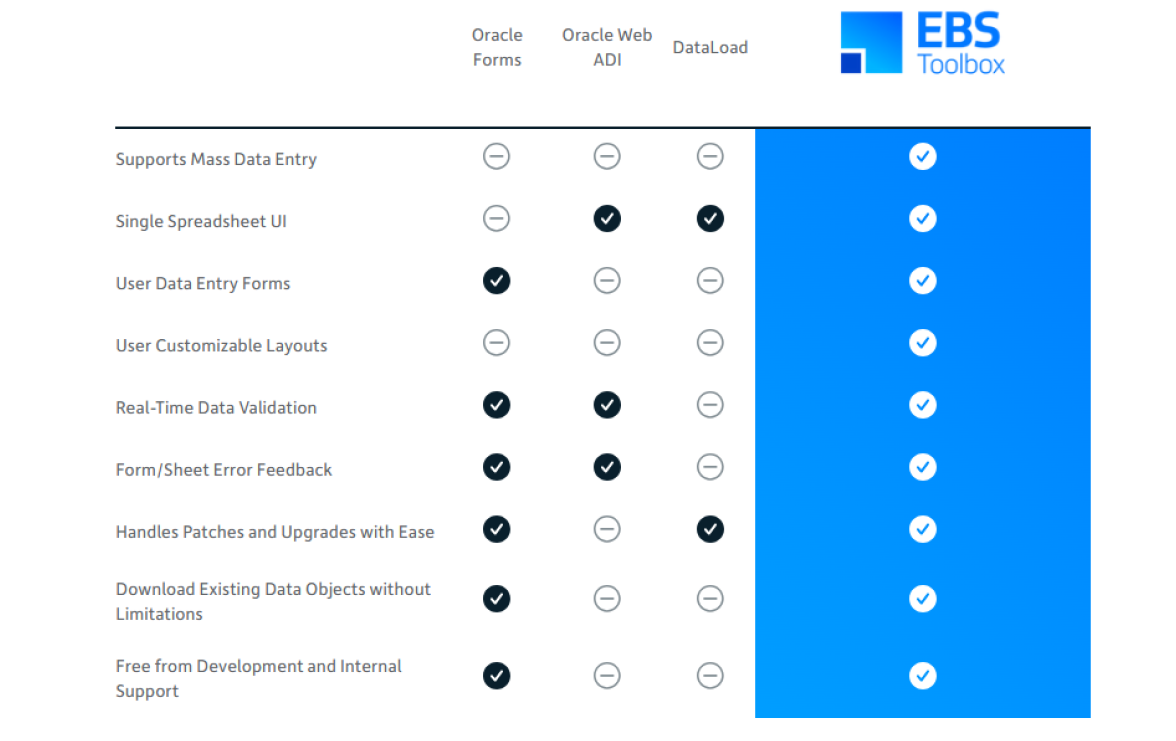
The More4apps EBS Toolbox transforms the traditional data-entry experience with a fully integrated, spreadsheet-based approach that’s powerful yet intuitive.
Key Features:
• Single Spreadsheet Layout: Manage all your data in one place—no macros, scripts, or cursor actions required.
• One-Click Uploading: Push data directly into Oracle EBS with minimal effort.
• Advanced Validation: Identify and correct errors instantly within Excel before submitting data.
• Flexible Layouts: Add, remove, or rearrange columns to match your processes.
• Integrated Download: Extract, update, and re-upload data seamlessly.
• End-User Control: Empower functional users to own the data process without IT dependency.
Organizations using More4apps report completing common EBS tasks, such as creating fixed assets, up to 30 times faster than with Oracle Forms or DataLoad.
The GL Wizard: A Smarter Alternative to Web ADI
Among the suite of tools available in the EBS Toolbox, one area where organizations see immediate impact is in General Ledger management—where the More4apps GL Wizard offers a modern, flexible alternative to Web ADI.
Built for today’s Oracle EBS environments, the GL Wizard delivers all the functionality users expect from Web ADI—plus the flexibility and stability that modern finance teams need.
With the GL Wizard, users can
• Create Actual, Budget, and Encumbrance journals directly from Excel
• Manage multiple ledgers, periods, and data sheets at once and in a single sheet
• Modify layouts using standard Excel skills—no developer required
• Attach supporting documents and leverage DFFs (descriptive flexfields)
• Load large datasets quickly, securely, and without IT assistance
• Stay fully compatible with Microsoft Office 2013 to Office 365, EBS 11i, and R12
The GL Wizard delivers all the functionality users expect from Web ADI without the fragility, limitations, or IT overhead—the result is faster journal entry, fewer errors, and complete control.
The Bottom Line
Your Oracle EBS investment already holds the tools for greater productivity. The first step toward turning your investment into measurable ROI starts with the right tools—intuitive tools designed for end users that simplify complex data-loading tasks, cut down their manual effort, and give them full control of their data, without costly upgrades or IT dependency.
Take the next step: Request a personalized More4apps demo to experience smarter data loading for EBS.
#CloudERP#EBSFinancials#E-BusinessSuite#BusinessUseCase#Cloud Applications
#On-PremiseApplications